
RAMMap Empty Standby List on Windows 11 removes reclaimable cached pages for a defined test; it does not repair a process or driver that keeps allocating memory. Save a baseline, change one variable, measure the workload and stop if the symptom is not reproduced.
What the Windows 11 standby list actually is
Use RAMMap Empty Standby List on Windows 11 only as a defined comparison. Save Use Counts, Available memory and the workload before changing anything, then compare the same action with a warm and cold cache.
Windows keeps recently used file data in memory because reading it again from RAM is usually faster than reading it from storage. Clearing that cache can make a graph look cleaner for a moment, yet the same files may be loaded again immediately. The result can be more disk I/O, longer application launches and a misleading belief that a recurring allocation was fixed.
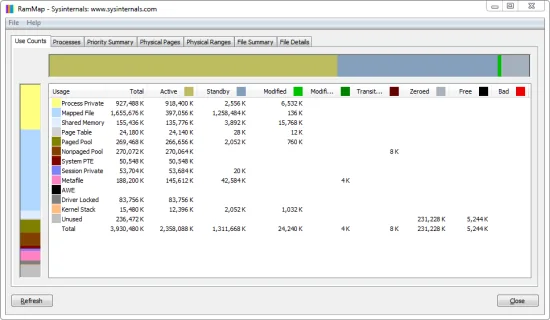
The official Microsoft RAMMap documentation describes Use Counts, Priority Summary, Physical Pages and File Summary views that help identify what the cached pages represent before you remove them.
| State | Can Windows reuse it? | Practical meaning |
|---|---|---|
| Active | Not immediately | Currently used by a process, driver or the system |
| Standby | Yes | Cached content retained for speed and reclaimable under pressure |
| Modified | After processing | Changed data generally needs writeback before reuse |
| Free | Yes | Available page that has not necessarily been zeroed |
| Zeroed | Yes | Available page prepared for a new allocation |
RAMMap vs EmptyStandbyList.exe: choose by purpose and source
RAMMap and EmptyStandbyList.exe are not the same program. RAMMap is a current Microsoft Sysinternals diagnostic utility with multiple memory views, snapshot support and an Empty menu. EmptyStandbyList.exe is the name commonly associated with a small third-party command-line utility designed to trigger specific memory-list operations.
The difference matters because a troubleshooting tool should explain the state before it changes it. RAMMap lets you inspect Use Counts, Priority Summary and File Summary, save evidence and then run one test. A single-purpose executable is easier to script, but it can also turn a diagnostic action into an unexplained scheduled cleanup. Lowering Standby every few minutes does not remove the process, driver, mapped file or workload that caused the pages to accumulate.
During this page review on July 16, 2026, a current first-party release page and verifiable current package for EmptyStandbyList.exe could not be confirmed. This site therefore does not mirror or label a third-party copy as official. The supported download path on this page is the current Microsoft RAMMap ZIP, whose v1.63 executables and SHA256 were verified against Microsoft and WinGet data.
| Question | Microsoft RAMMap | EmptyStandbyList.exe |
|---|---|---|
| Primary purpose | Inspect physical memory and run controlled actions | Trigger selected list or working-set actions |
| Current first-party source | Microsoft Learn and download.sysinternals.com | Not verified during this review |
| Visual diagnosis | Yes: Use Counts, Processes, Priority and file views | No comparable analysis interface |
| Snapshots | Save and load RAMMap snapshots | Not the tool's main purpose |
| Automation risk | Manual action discourages blind scheduling | Easy to schedule without measuring side effects |
| Best fit | Diagnosis and one controlled cache test | Only when provenance and a specific scripted need are already established |
A filename is not proof of origin. Do not treat a random mirror, repackaged archive, search advertisement or forum attachment as an official EmptyStandbyList.exe download.
How to empty the standby list with RAMMap on Windows 11
Use this procedure only when you have a specific question, such as comparing a warm-cache and cold-cache run of the same application, reproducing a support case or checking whether cached file data explains a benchmark difference. Save work first because clearing useful cache can temporarily slow the next launch or file read.
Download RAMMap from the official Microsoft host, extract the whole ZIP and run RAMMap64.exe on a typical Intel or AMD Windows 11 PC. Use RAMMap64a.exe on Windows on ARM. The current package checked for this guide is v1.63, released March 26, 2026, with a 737,190-byte ZIP and SHA256 6536A8107A3FB391E4443F2742366067341A7DA50DE89F99CA0B2390120DD0CC.
- Record the baseline
Open Use Counts and note Total, Active, Standby, Modified, Free and Zeroed values. Save a RAMMap snapshot when the comparison needs evidence.
- Define one repeatable task
Choose the same application launch, file operation, game level or benchmark input. Keep app version, files and storage unchanged.
- Run the warm-cache test
Measure the task before clearing anything. Record elapsed time, disk activity and the symptom you are investigating.
- Empty only the standby list
Choose Empty > Empty Standby List once. Do not also empty working sets, modified pages and priority lists in the same comparison.
- Repeat and compare
Run the identical task again, refresh RAMMap and compare performance plus I/O. Expect the cold-cache run to read more data from storage.
- Let Windows rebuild cache
Do not schedule repeated clearing. Continue normal use and see whether the original symptom returns under the same workload.
RAMMap's Empty menu changes system memory state. Use it as a measured experiment, not as a permanent fix for high RAM usage.
When an Empty Standby List test helps—and when it does not
A one-time clear can help create a cold-cache condition for testing, separate storage performance from cached performance, or reproduce a support procedure. It may also show whether a large Standby value immediately returns because the same files are being read again. That is diagnostic information, not proof that the cache itself is defective.
It does not repair a memory leak, add physical RAM, reduce application demand, fix a driver allocation or improve every game. If Process Private keeps growing, inspect the owning process. If Nonpaged Pool grows continuously, investigate drivers. If Mapped File or Standby grows during repeated file access while Available remains healthy, Windows may simply be using idle RAM as cache.
For deeper interpretation, use the RAMMap memory types guide. For the exact meaning and risks of every Empty menu command, keep the operational instructions on the RAMMap clear cache page.
- Useful: a documented warm-cache versus cold-cache comparison.
- Useful: reproducing a specific vendor or support procedure once.
- Not useful: clearing memory every few minutes because Standby looks large.
- Not useful: hiding a process, driver or workload that immediately allocates memory again.
- Risky: combining several Empty commands and then guessing which change affected the result.
How to judge an EmptyStandbyList download result
Search results for EmptyStandbyList downloads often mix old references, mirrors, forum attachments, repackaged utilities and pages that use Microsoft RAMMap terminology. Before running any executable with administrator rights, identify the original publisher, a current first-party page, an unmodified download URL, a reproducible hash and a signature or other verifiable release record.
If those checks are missing, the safer choice is not to substitute confidence with popularity. Use the official Microsoft RAMMap package for the manual test, or leave the standby list alone while diagnosing the actual allocation. This page intentionally does not provide a direct EmptyStandbyList.exe file link because a current first-party artifact was not verified.
For RAMMap itself, use the site's source and signature verification guide. The official ZIP should come from download.sysinternals.com, and the executable signature should validate to Microsoft Corporation.
A controlled RAMMap Empty Standby List comparison
Record Use Counts, Available memory, the workload and a timed result before clearing. Empty Standby List is useful only when the same workload can be repeated with a warm and cold cache. If the number returns after opening the same files, that is expected cache rebuilding, not proof that the command failed.
Keep RAMMap, EmptyStandbyList.exe and automatic scheduled cleaners separate in your notes. A test command changes one list at a known time; a recurring cleaner changes the system before you can diagnose it. Stop the experiment when the symptom is unchanged and investigate the process, mapped file, pool or paging signal instead.
Empty Standby List FAQ
Is a large standby list bad in Windows 11?
Not by itself. Standby pages contain cached data and are reclaimable when applications need memory. Check Available memory, paging, responsiveness and the allocation category before treating Standby as a fault.
Does Empty Standby List increase FPS?
There is no general guarantee. Clearing cache may help reproduce one stutter or cold-cache scenario, but it can also increase storage reads and make the next load slower. Measure the same workload instead of relying on the lower number.
Should I schedule EmptyStandbyList.exe every five minutes?
No. Repeated scheduled clearing discards useful cache without fixing the workload that rebuilds it. It can add I/O and hide evidence needed to diagnose a process or driver.
Which RAMMap command clears standby memory?
Empty > Empty Standby List clears the standby list. Use it once for a defined test. Empty Priority 0 Standby List is narrower, while working-set and modified-page commands affect different memory categories.
Where should I download EmptyStandbyList.exe?
Only use a current first-party source that you can verify. This review could not confirm a current first-party package, so this site does not provide a mirror. Microsoft RAMMap is the verified option for a manual standby-list test.
Is RAMMap v1.63 the current version?
Yes for the July 16, 2026 verification. The official ZIP contained signed x86, x64 and ARM64 executables reporting version 1.63, and its SHA256 matched the Microsoft WinGet manifest.
Download RAMMap v1.63 from Microsoft
Use the current signed Sysinternals package to inspect the standby list before running one controlled Empty command.